Class Companion: How the AI Platform Works for Teachers and Students
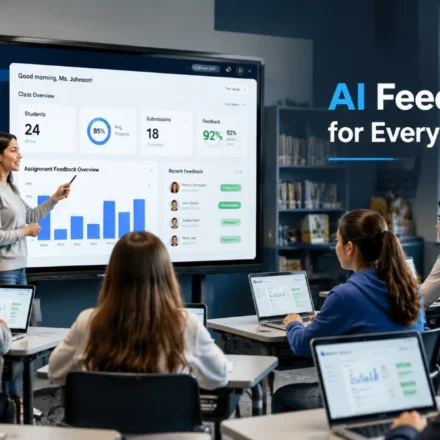
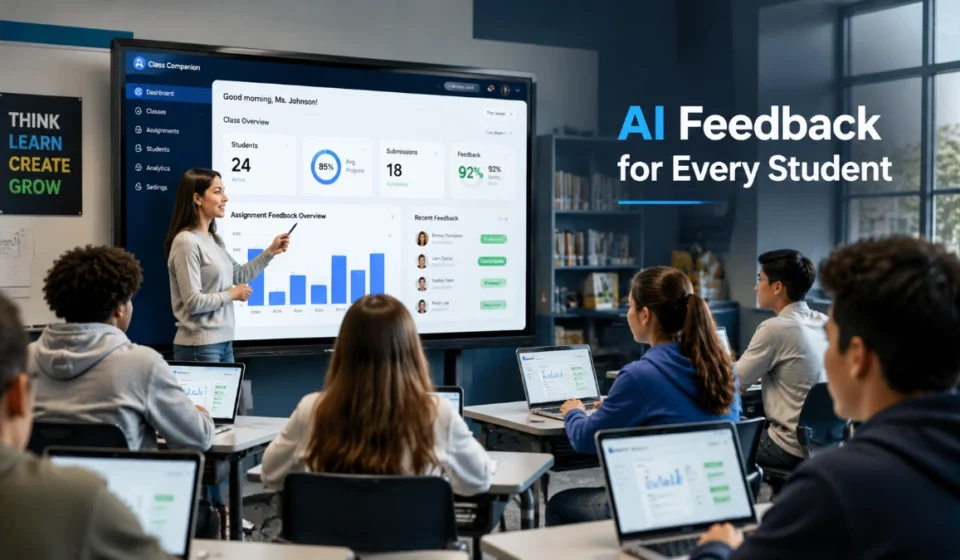
Class Companion is an AI-powered education platform built around a simple classroom problem: teachers need a faster way to give useful feedback, while students benefit most when feedback arrives early enough to revise and try again. The platform lets teachers create or import assignments and rubrics, configure how students complete the work, and review AI-generated scores and feedback. Students receive rubric-aligned guidance, can use an AI tutor when enabled, and may get multiple attempts to improve their responses.
The same platform therefore serves two different workflows. Teachers control assignment design, grading criteria, settings, review, and classroom insights. Students mainly interact with assigned questions, feedback, revisions, analytics, and tutoring. Understanding that role split is the easiest way to decide whether the tool fits a single classroom, a department, or a broader school deployment.
What Is Class Companion?
Class Companion is designed for teacher-directed practice and assessment rather than open-ended chatbot use. Teachers can generate an assignment with AI, import one from a file or pasted text, choose from a public content library, or build an assignment from scratch. Supported question formats include short answer, essay, and multiple choice, while written-response questions can be evaluated against teacher-selected or custom rubrics.
For students, the platform turns those assignments into a feedback loop. After submitting work, students can receive AI-powered scoring and feedback based on the assignment settings, revise when additional attempts are allowed, and use the AI tutor for help if the teacher has left it enabled. The current Class Companion help documentation says the tutor is intended to help without giving away the answer, and teachers can view a student’s tutor conversation history.
Its May 2026 documentation says its underlying AI models are based on OpenAI’s GPT-4. The company also notes that model output can vary, which is important when interpreting AI-generated scores or feedback.
How It Works for Teachers
The teacher experience is the control layer of the platform. Teachers decide what students see, what the AI evaluates, how many attempts are available, when feedback appears, and when human judgment should replace or modify an AI-generated result.
Creating assignments
Teachers have four main starting points: generate an assignment with AI, import content from a file or pasted text, choose material from the public assignment library, or create an assignment from scratch. During setup, they can add questions, attach context for the AI, and build or apply a rubric for written responses.
That flexibility makes the platform useful beyond essay grading. A teacher can combine short-answer, essay, and multiple-choice questions in one assignment, choose whether essay responses are typed or handwritten, and decide how students move through the questions.
Building rubrics that produce better feedback
Rubric quality matters because the AI uses the rubric to interpret the student’s work. Class Companion’s own guidance recommends breaking complex expectations into simpler criteria, using precise language, and adding examples when examples would help a human grader understand the standard.
In practice, this means the teacher is not merely accepting a generic AI judgment. The teacher defines the evaluative framework. A narrowly written criterion such as identifying relevant evidence and explaining how it supports a claim gives the system a clearer target than a vague instruction such as “good analysis.”
Controlling submission and feedback settings
Teachers can configure the number of attempts for each question, set a time limit, decide whether questions must be completed in order, and choose whether feedback appears immediately or at the end. They can also hide rubrics or scores, shuffle multiple-choice answers, disable pasting, and manage accessibility-related features such as narration, dictation, and translation.
This is one of the platform’s most important classroom features because the same AI tool can be configured differently for practice and assessment. A revision-heavy formative assignment can allow repeated attempts and immediate feedback, while a more controlled task can use a timer, restrict pasting, or delay feedback until completion.
Using the AI tutor
The AI tutor can be turned on or off for an assignment. When enabled, it is designed to guide students without simply handing over the answer. According to the current help documentation, it can explain, prompt, and support students while remaining visible to the teacher through conversation history.
That teacher visibility matters. The tutor is not a separate private chatbot operating outside the instructional workflow; it is part of the assignment experience and remains under teacher control.
Reviewing submissions, insights, and disputes
Teachers can view student submissions and class or student insights. Current reports include measures such as common feedback, median scores, repeat-attempt rates, dispute rates, and dispute outcomes; premium access adds further reporting, including progress over time.
Teachers can also adjust or overrule AI-generated scores. If a student disputes feedback, the teacher can see the student’s proposed score and comments, then decide how to resolve the issue. This human override is a crucial safeguard because Class Companion itself acknowledges that AI-generated scoring can vary.
The Student Experience
Students do not use the platform the same way teachers do. Students are invited into a teacher-created class, then work inside the assignments and settings the teacher has chosen.
Students can be invited through a shared link, email invitation, or join code. They can join using an email address, Google, or Clever. Their dashboard shows enrolled classes and available assignments, while an Analytics area can show the student the same student-level insights that the teacher can view.
What happens when a student submits work?
The exact experience depends on the teacher’s settings. A student may receive feedback immediately after a response or only after finishing the assignment. The teacher may expose or hide the rubric and score, and may permit one or multiple attempts.
When feedback is visible, the core value is that it can be tied to the rubric rather than appearing as a single unexplained score. That structure can help a student distinguish between different weaknesses-for example, whether the problem is evidence, reasoning, accuracy, organization, or another teacher-defined criterion.
Can students revise their answers?
Yes, when the teacher allows additional attempts. The number of attempts is configurable per question, so revision is a teacher-controlled part of the assignment rather than an unlimited right on every task.
This makes the platform especially suited to iterative practice. A student can respond, inspect feedback, revise the work, and try again while the reasoning behind the original answer is still fresh.
Can students challenge an AI score?
Yes. Current Class Companion documentation states that students can dispute feedback and that teachers see the student’s proposed score and comments. Teachers remain responsible for resolving the disagreement and can override the AI-generated score.
That is an important distinction from systems where an algorithmic grade appears final. Here, the AI can provide the first evaluation, but the teacher retains authority over the outcome.
Assignments: What Teachers Can Configure
Assignment design is where many of the platform’s practical differences become visible. Teachers can control both the content and the conditions under which students complete it.
| Assignment control | What it changes for students |
| Question type | Short answer, essay, or multiple choice |
| Rubric | Defines how written responses are evaluated |
| Attempts | Controls how many times a student can retry a question |
| Feedback timing | Determines whether feedback appears immediately or at the end |
| Score visibility | Allows the teacher to show or hide scores |
| Rubric visibility | Allows the teacher to show or hide grading criteria |
| Time limit | Restricts how long students have to complete the assignment |
| Pasting | Can be disabled in the response box |
| Essay format | Can allow typed, handwritten, or either format |
| Accessibility settings | Can manage narration, dictation, translation, and other supports |
These controls are useful because “AI feedback” is not a single classroom mode. A teacher can make the experience highly supportive for practice or more constrained for an assessment. The quality of the result still depends on instructional design: clear questions, suitable rubrics, and teacher review remain essential.
Free vs. Paid Class Companion Plans
The free teacher plan is designed for individual classroom use, while school and district plans add deeper integrations, administrative features, expanded integrity tools, and premium analytics. The company does not publish a standard school or district price on its public plan pages; schools are directed to book a demo or contact the vendor.
| Capability | Free teacher plan | School/district plan |
| Instant AI feedback and scoring | Yes | Yes |
| AI tutoring | Yes | Yes |
| Basic class, assignment, and student insights | Yes | Yes |
| Google Classroom or Clever class/student import | Yes | Yes |
| Canvas and Schoology LMS integration | No | Yes |
| Assignment and grade syncing with supported LMSs | No | Yes |
| Pasted-text detection | Yes | Yes |
| Typing-anomaly, copy/leave-tab, and similar-response detection | No | Yes |
| Premium insights and school/district administration | No | Yes |
| Publicly listed price | $0 for teachers | Quote/demo required |
The LMS distinction is especially important. On the free plan, teachers can import classes and students from Google Classroom or Clever. Premium school or district plans can sync classes, students, assignments, and grades through Google Classroom, Clever, Schoology, or Canvas, and can pass grades back to the LMS.
For an individual teacher testing the platform, the free plan therefore covers the core feedback workflow. A school or district is more likely to need premium access when it wants centralized deployment, deeper LMS syncing, expanded integrity signals, standards alignment, private content libraries, premium insights, administrative reporting, or dedicated support.
Response Integrity: What the Signals Can and Cannot Tell You
The platform includes response-integrity features, but they should be interpreted as signals for review rather than proof of misconduct. On the free plan, teachers can see text pasted into a response. Paid plans add signals involving typing anomalies, copying and leaving the tab, and similarity to other student responses. The company’s own guidance says teachers should evaluate student work individually rather than treating detection as a definitive verdict.
That limitation matters for both teachers and students. A flag can identify work that deserves a closer look, but it does not establish why a behavior occurred. The teacher still needs context, conversation, and professional judgment before concluding.
Accessibility and Learning Support
The platform includes accommodations intended to make assignments more usable for different learners. Current product materials describe supports such as reading-level adjustments, translation, text-to-speech, speech-to-text or dictation, and extended time. The AI tutor can also work with supported accommodations such as text-to-speech and translation.
These features do not remove the need for a teacher or school to follow a student’s formal accommodation plan, but they can make it easier to configure classroom practice in ways that match documented needs.
Privacy, Student Data, and AI Model Use
The company states that it complies with FERPA and COPPA and is a Student Privacy Pledge signatory. Its public materials also state that it does not market, sell, or rent users’ personal information or use that information for advertising.
Its May 2026 AI-model documentation says the platform does not share personally identifiable information with OpenAI and that OpenAI does not use user or student data from the platform to train its models.
Schools should still review the current privacy policy, district data-processing requirements, local approval rules, and any applicable state obligations before adoption. Vendor compliance statements are an important starting point, but district policy determines whether and how a tool may be used with student data.
Who Is It Best Suited For?
The platform is strongest when the instructional goal benefits from repeated practice, rubric-aligned feedback, and teacher oversight.
Individual teachers: The free plan can support teachers who want to create written-response practice, give faster rubric-based feedback, let students revise, and experiment with AI tutoring without purchasing a school license.
English, social studies, science, and world-language classrooms: The company supports these subjects and others across grades from kindergarten through higher education, although the assignment design and feedback expectations should be appropriate to the learners’ age and subject.
Departments and schools: Paid access becomes more relevant when teams need shared or private content libraries, standards alignment, premium analytics, stronger integrity signals, or deeper LMS workflows.
Districts: District leaders evaluating a broader AI environment may encounter Solara with Class Companion, which combines Panorama’s district-focused AI platform with Class Companion’s classroom assignment and feedback experience. Panorama acquired Class Companion on April 23, 2025, and announced the launch of Solara with Class Companion on October 28, 2025.
What Teachers and Students Should Keep in Mind
The platform can shorten the feedback cycle, but it should not be treated as an infallible grader. The company explicitly notes that GPT-4-based outputs can vary, even when the same answer is submitted more than once. That makes clear rubrics, previewing assignments, reviewing unusual results, and allowing an appropriate dispute process especially important.
For teachers, the main value is leverage: the system can handle a first layer of feedback, surface patterns, and give students more opportunities to practice. For students, the main value is immediacy: feedback, tutoring, revisions, and disputes can happen inside the same assignment workflow. The strongest use is therefore not “AI replaces grading,” but “AI supports a teacher-controlled cycle of practice, feedback, revision, and review.”
Read more: Class Companion: How the AI Platform Works for Teachers and Students
Bottom Line
The platform is most useful as a teacher-controlled feedback and practice platform, not as an autonomous replacement for classroom judgment. Teachers define assignments, rubrics, attempts, feedback timing, tutoring access, and final score decisions; students receive faster feedback, use guided AI support, revise when permitted, and can dispute results. The free plan is substantial enough for individual classroom use, while school and district plans become more relevant when deeper LMS integration, integrity tools, analytics, administrative controls, and broader deployment matter.
Frequently Asked Questions
Is Class Companion free for teachers?
Yes. The company currently offers a free teacher plan. School and district plans add features such as deeper LMS integration, expanded response-integrity tools, standards alignment, private content libraries, premium insights, and administrative capabilities.
Do students need a separate account?
Students need access to a teacher-created class, but they are not limited to LMS roster import. Teachers can invite students with a link, email, or join code, and students can join with an email address, Google, or Clever.
Does Class Companion work with Google Classroom?
Yes. Free teacher accounts can import classes and students from Google Classroom or Clever. Premium school or district plans add deeper syncing for assignments and grades and support Canvas and Schoology as well.
Can teachers override AI-generated scores?
Yes. Teachers can manually adjust or overrule scores on student submissions. This keeps final instructional judgment with the educator rather than the model.
Can students dispute a score?
Yes. Students can dispute feedback, propose a score, and add comments. The teacher sees the dispute and decides whether to accept or overrule it.
Does the AI tutor give students answers?
The platform says its AI tutor is designed to help without giving away the answer. Teachers can enable or disable it for an assignment and can view the student’s tutor conversation history.
Can students revise and resubmit work?
Yes, when the teacher allows additional attempts. Teachers set the number of attempts for each question during assignment configuration.
Can the platform detect AI-written work?
It provides response-integrity signals rather than a guaranteed determination of AI authorship. Free accounts can show pasted text, while paid plans add typing anomalies, copy/leave-tab behavior, and similarity detection. The company advises teachers to review student work individually.
What subjects and grade levels does it support?
Class Companion says it supports subjects including English, social studies, science, and world languages, with use cases spanning kindergarten through higher education. Teachers still need to match assignment complexity, feedback, and supports to the specific learners.
What is Solara with Class Companion?
It is Panorama Education’s district-focused offering that combines Solara’s broader AI and student-data environment with Class Companion’s classroom assignment, tutoring, feedback, and instructional-insight capabilities. Panorama acquired Class Companion in April 2025 and launched the combined offering in October 2025.